
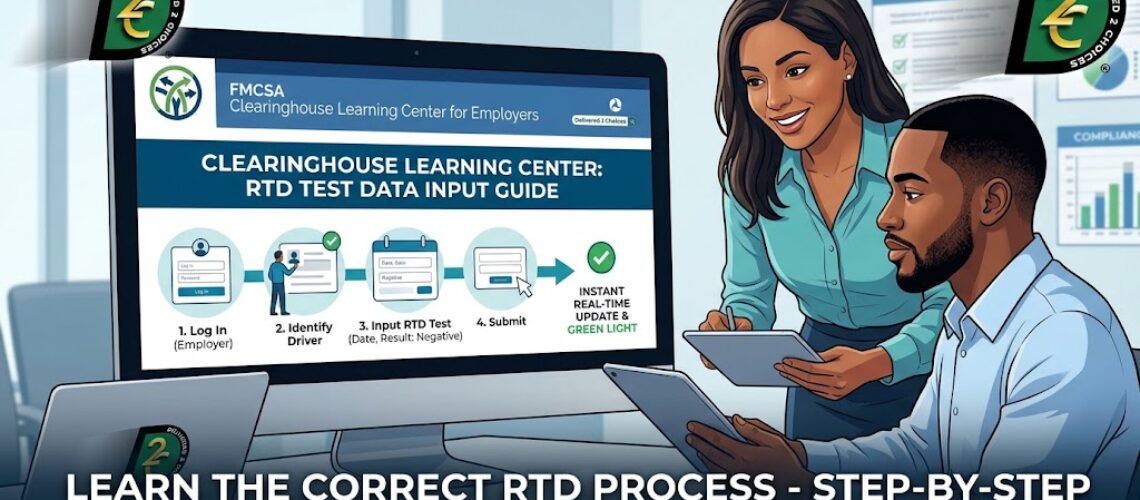

Although the learning curve is getting better across the commercial transportation industry, widespread confusion regarding Return-to-Duty (RTD) results is still a concern worth being reminded of. Employers and administrative staff frequently struggle with the reporting process. Specifically, they want to know who is responsible, when to report, and how quickly a driver can get back to work.
Failing to understand these federal rules can lead to severe compliance errors and onboarding delays. Fortunately, keeping your record clean is simple when you follow the correct guidelines. If you need to upload the RTD test into the DOT Clearinghouse, here is exactly how to navigate the system safely.
Table of Contents
ToggleCritical Compliance Guidelines for Employers and C/TPAs
Fulfilling your safety reporting duties requires adhering to strict federal parameters. Therefore, you must keep these three critical rules in mind:
1. Designated Responsibility The Designated Employer Representative (DER) or the Consortium/Third-Party Administrator (C/TPA) holds the sole responsibility to upload the RTD test into the DOT Clearinghouse. Surprisingly, the Substance Abuse Professional (SAP) does not handle this specific step.
2. The 3-Day Submission Deadline Federal regulations mandate that you must submit this information quickly. Consequently, you must upload the results by the close of the third business day following the exact date you received the negative laboratory report. You can read more about this exact rule on the FMCSA Safety Planner guidelines.
3. Immediate Driver Reinstatement The moment you enter the required information and click submit, the driver’s federal status changes. As a result, you can immediately allow them to perform safety-sensitive functions for your company. Please note, however, that formal DMV reinstatement typically takes an additional 24 to 48 hours to process, and drivers may be subject to possible DMV reinstatement fees based on their specific state’s discretion.
How to Upload Negative RTD Results into the Clearinghouse
The learning curve has improved significantly since the launch of the Clearinghouse in January 2020. Uploading negative RTD results is a straightforward process:
- The employer logs in to their Clearinghouse registry.
- Enter the required information: the driver’s name, Date of Birth (DOB), the RTD test date, and the date the test results came back.
- Hit the “Submit” button.
Instantly, the Clearinghouse is updated in real time. Within seconds, the dashboard will reflect the “green light” for the driver and display the crucial 5th checkmark. The driver can immediately begin to drive. This process of uploading the negative results does not take weeks, days, or even hours—it is completely instant.
For additional step-by-step guidance, you can also visit the official FMCSA Clearinghouse Learning Center for Employers. Their portal provides excellent tutorials and visual walkthroughs on how to upload both RTD tests and final follow-up tests, as well as a breakdown of all exact reporting timelines.
Document Retention: What Actually Needs to be Uploaded?
Many fleet managers mistakenly believe they have to record every single follow-up drug test. In reality, an employer or C/TPA only inputs two specific tests into the portal database:
- The initial negative RTD test result that allows the driver to return to work.
- The final follow-up test result at the very end of the driver’s multi-year testing plan.
Meanwhile, you should store every other follow-up test from the SAP’s plan safely within your internal company records. In fact, it isn’t even possible to upload every follow-up test to the federal database. The Clearinghouse system is essentially foolproof and will not allow you to report each test, preventing you from making this administrative mistake. However, you must still keep these internal records accessible in the event of an unexpected DOT safety audit.
Furthermore, while delaying this reporting process will not trigger a permanent commercial license downgrade, it will absolutely delay the onboarding and hiring process for your driver. Even worse, administrative delays and compliance gaps act as major red flags that could trigger a DOT safety audit. To understand exactly how these state-level penalties operate, you can still review the official FMCSA CDL Downgrades FAQ.
Need Hands-On Compliance Support?
Navigating the federal dashboard can feel overwhelming, and simple administrative mistakes can cause severe operational delays. At Delivered 2 Choices, we provide expert consulting to keep your company records completely audit-proof.
Do not let paperwork delay your process. Call us at 916-399-3047 or Text us at 916-399-3047 today, and let Delivered 2 Choices show you the easiest way to manage your testing data!